Pixelbridge
Visual Content spielt eine wichtige Rolle, um Kunden zu erreichen und zu binden. Der Kunde ist anspruchsvoll und erwartet bei allen Touch-Points der Customer Journey ein gleichbleibend erstklassiges Markenerlebnis. Die Herausforderung liegt hier in den verschiedenen Kanälen, die alle mit Bildern Ihrer Marke versorgt werden. Mit unserer Technologie Pixelbridge gelingt es Ihnen leicht und beeindruckend schnell durch konsistente Markenbilder Verbindungen zwischen allen Erlebnissen mit Ihrer Marke herzustellen, sowohl online als auch offline.
SO LEISTUNGSSTARK, DASS ES IHREN VISUAL CONTENT ON-THE-FLY AUTOMATISCH FÜR JEDEN KANAL OPTIMIERT.
Beim Publizieren von Bildern auf Ihrer Website, Ihrem Blog, Ihrem Shop oder Ihrer App geht es um Flexibilität und Performance. Mit Pixelbridge haben wir ein kraftvolles Image Publishing Framework kreiert, mit dem Sie das Ausgabeformat von Bildern und Grafiken standardisiert regeln können. Das Programm berechnet auf Basis eines einzigen hochwertigen Ursprungsbildes die optimale Auflösung für die jeweilige benötigte Anwendung. Es erlaubt Ihnen darüber hinaus vielfältige und frei kombinierbare Bildmanipulationen. Fügen Sie Logos, Wasserzeichen oder Texte zu einem Bild hinzu, wenden Sie Freistellpfade an oder manipulieren Sie die Farben. Mit Pixelbridge erhalten Sie das Beste: Qualität in Kombination mit hoher Geschwindigkeit.
PIXELBRIDGE FUNKTIONALITÄTEN
Alle Grafikfunktionen sind miteinander kombinierbar, auch mehrfach in beliebiger Reihenfolge.
- Formatkonvertierung
- Skalieren
- Bildrotation
- Ecken abrunden
- Wasserzeichen
- Helligkeit und Kontrast
- Freistellungspfad erkennen und anzeigen
- Perspektivenverzerrung
- Schrift einfügen
WIE PIXELBRIDGE FUNKTIONIERT
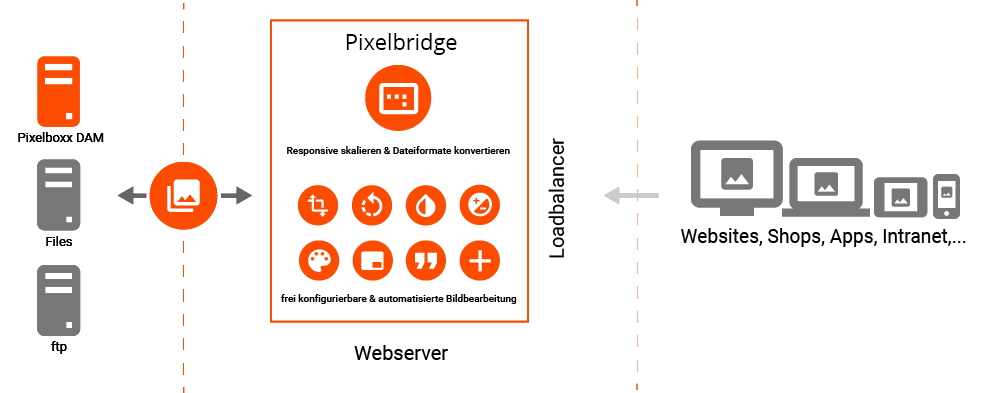
MODERNE TECHNOLOGIEN, DIE IHNEN KONSISTENTE MARKENERLEBNISSE BEI KURZEN LADEZEITEN SICHERN.
Der intelligente Pixelbridge-Cache sorgt dafür, dass die Bilder außergewöhnlich schnell erzeugt und bereitgestellt werden. Pixelbridge untersucht den Ableitungspfad der erzeugten Bilder. Das Tool erkennt, welche Zwischenschritte für künftige Operationen wichtig sind, merkt sie sich und beschleunigt dadurch den Prozess im Vergleich zu klassischen Webcaches enorm. Dabei werden moderne In-Memory Technologien mit klassischen Disc basierten Caches kombiniert, um mit geringstmöglichen Latenzen das optimale, passende und qualitativ hochwertige Bildprodukt zu erzeugen.
NAHTLOSE INTEGRATION AUF DER GANZEN LINIE.
Nutzen Sie Ihr DAM-System oder andere Datenquellen. Anbindungen lassen sich für alle gängigen Schnittstellen leicht umsetzen. Dazu gehören CMS-, Shop, ERP-, Web2Print- und PIM-Systeme.
ALLES, WAS SIE BRAUCHEN, UM MIT VISUAL CONTENT NOCH ERFOLGREICHER ZU SEIN.
- Geschwindigkeit: Pixelbridge vereinfacht Ihre Arbeitsabläufe und gestaltet sie effizienter. So sparen Sie sowohl Zeit als auch Geld und Visual Content ist schneller dort, wo Ihre Kunden ihn sehen.
- Flexibilität: Mit Pixelboxx Pixelbridge publizieren Sie Bilder ohne Brüche in der digitalen Kette direkt auf Websites oder in Apps. Sie benötigen keine zusätzlichen aufwändigen Softwaretools, um Bilder zu bearbeiten. Bei der Kreation müssen Sie sich so keine Gedanken machen, in welchen Kanälen Sie Ihren Content nutzen möchten. Pixelbridge übernimmt die Anpassungen. So haben Sie immer das richtige Bild an der richtigen Stelle.
- Konsistenz: Pixelbridge gewährleistet eine optimale Qualität Ihrer Bilder an allen unterschiedlichen Kunden-Touch-Points. So bekommen Ihre Kunden, egal ob sie sich beispielsweise im Shop, auf der Website oder in der App befinden, immer dasselbe hochwertige Markenerlebnis.